
Cluster Deployment
Nacos Cluster Mode
This deployment guide helps you quickly download, install, and use Nacos on your computer, and deploy cluster mode for production use.
Cluster Deployment Architecture
Regardless of the deployment method, we recommend placing all service nodes in the Nacos cluster behind one VIP and then binding the VIP to a domain name.
<http://ip1:port/openAPI> Direct IP mode. If the machine fails, you must modify the IP address before the endpoint can be used again.
<http://SLB:port/openAPI> SLB mode. Use an internal SLB and do not expose it to the public network to avoid security risks. Clients connect directly to the SLB, and real server IPs are mounted behind it, which is less readable.
<http://nacos.com:port/openAPI> Domain name plus SLB mode. Use an internal SLB and do not expose it to the public network to avoid security risks. This mode is readable and makes IP replacement easier. It is the recommended mode.
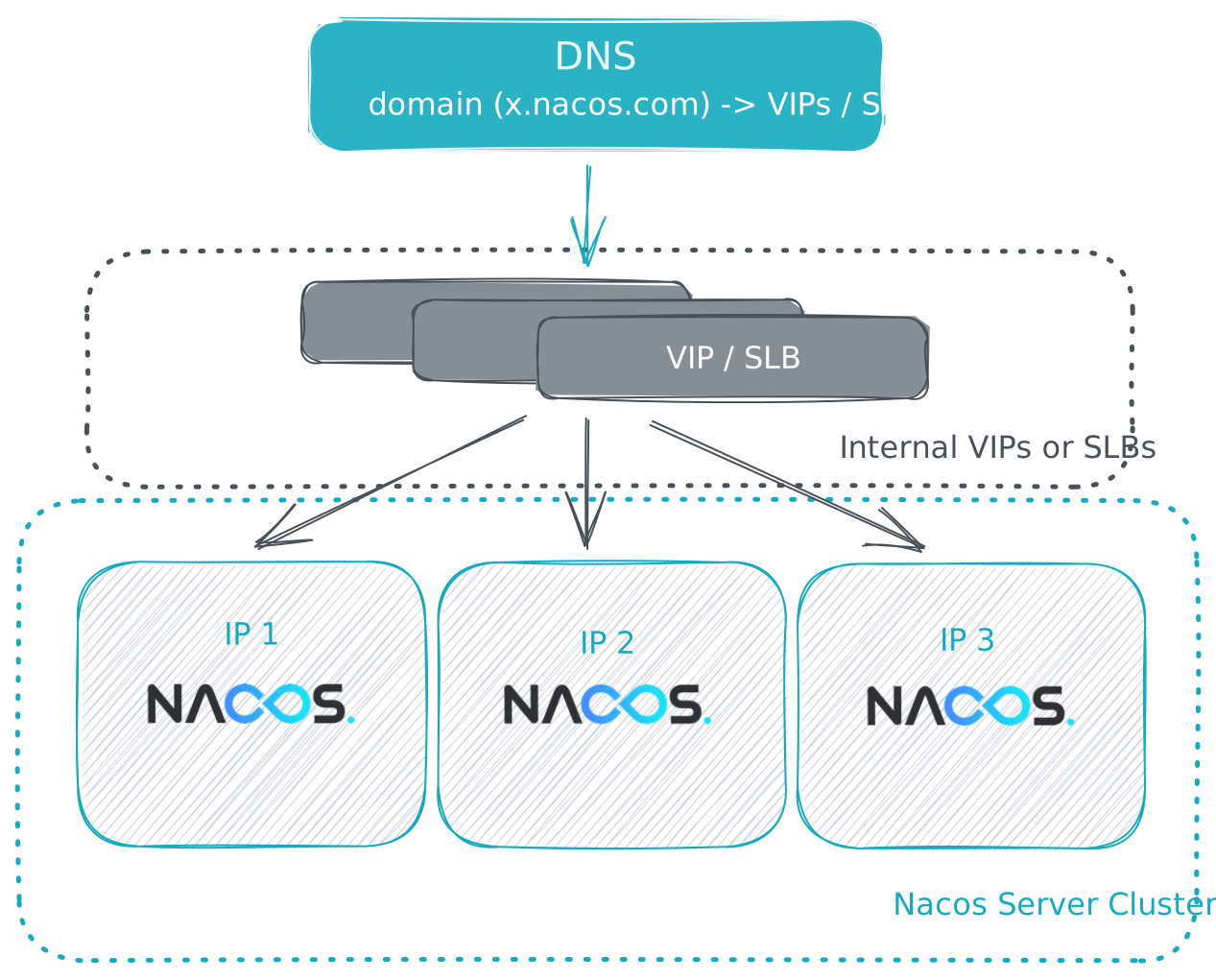
When using a VIP, open the main Nacos service port (default 8848) and the gRPC port (default 9848). If you change the main Nacos port, configure the corresponding port mapping in the VIP. For port mapping details, see Deployment Overview - Nacos Deployment Architecture.
1. Release Package Deployment
1.1. Use MySQL Database (Recommended)
1.1.1. Environment Preparation
Refer to Quick Start to prepare the Nacos environment and download the release package.
When deploying Nacos cluster mode with a MySQL data source, prepare the MySQL database yourself:
-
- Install the database. The required version is 5.6.5 or later.
-
- Initialize the MySQL database. Database initialization file: mysql-schema.sql.
1.1.2. Configure the Cluster Configuration File
In the conf directory under the Nacos decompression directory nacos/, configure the cluster.conf file with one ip:port entry per line. Configure three or more nodes.
# ip:port200.8.9.16:8848200.8.9.17:8848200.8.9.18:88481.1.3. Modify Configuration Files
Then modify ${nacos.home}/conf/application.properties, add the MySQL data source configuration, and configure the MySQL data source URL, username, and password.
nacos.plugin.datasource-dialect.type=mysql
nacos.plugin.datasource.db.num=1nacos.plugin.datasource.db.url.0=jdbc:mysql://${mysql_host}:${mysql_port}/${nacos_database}?characterEncoding=utf8&connectTimeout=1000&socketTimeout=3000&autoReconnect=truenacos.plugin.datasource.db.user=${mysql_user}nacos.plugin.datasource.db.password=${mysql_password}
1.1.3.1. Enable the Default Authentication Plugin
Since Nacos 3.0.0, console access authentication is enabled by default, so authentication-related configurations must be configured.
Modify application.properties in the conf directory.
Set the following items:
## Client access authentication is enabled by default starting in 3.3.nacos.core.auth.enabled=true## Enable console access authentication. Enabled by default.nacos.core.auth.console.enabled=truenacos.plugin.auth.type=nacosnacos.plugin.auth.nacos.token.secret.key=${custom_value_same_on_all_nodes}nacos.core.auth.server.identity.key=${custom_value_same_on_all_nodes}nacos.core.auth.server.identity.value=${custom_value_same_on_all_nodes}For details, see Authentication.
Note: the default values
SecretKey012345678901234567890123456789012345678901234567890123456789andVGhpc0lzTXlDdXN0b21TZWNyZXRLZXkwMTIzNDU2Nzg=in the documentation are public default values and can be used only for temporary testing. In actual use, replace them with other custom valid values.
1.1.4. Start the Nacos Cluster
On each deployment node, run the following commands to start Nacos nodes one by one or at the same time.
# Linux/Unix/Macsh startup.sh
# Ubuntu
bash startup.sh
# Windowsstartup.cmd
The startup program then prompts you to enter the following 3 authentication-related configurations:
`nacos.plugin.auth.nacos.token.secret.key` is missing, please set: ${your_input_token_secret_key}nacos.plugin.auth.nacos.token.secret.key` Updated:----------------------------------`nacos.core.auth.server.identity.key` is missing, please set: ${your_input_server_identity_key}`nacos.core.auth.server.identity.key` Updated:----------------------------------`nacos.core.auth.server.identity.value` is missing, please set: ${your_input_server_identity_key}`nacos.core.auth.server.identity.value` Updated:----------------------------------::: note
If you have configured these 3 settings in Modify Configuration Files, you will not be prompted to enter them.
:::
1.2. Use Derby Database
Note: Derby is a local built-in database and does not support cluster mode by itself. Nacos uses the Raft protocol to form a logical cluster from the Derby databases of each node. Therefore, when deploying Nacos cluster mode with this mode, you must be familiar with the Raft protocol and be able to troubleshoot and recover issues. We recommend deploying with a MySQL database.
1.2.1. Environment Preparation
Refer to Quick Start to prepare the Nacos environment and download the release package.
1.2.2. Configure the Cluster Configuration File
In the conf directory under the Nacos decompression directory nacos/, configure the cluster.conf file with one ip:port entry per line. Configure three or more nodes.
# ip:port200.8.9.16:8848200.8.9.17:8848200.8.9.18:88481.2.3. Enable the Default Authentication Plugin
Since Nacos 3.0.0, console access authentication is enabled by default, so authentication-related configurations must be configured.
Modify application.properties in the conf directory.
Set the following items:
## Client access authentication is enabled by default starting in 3.3.nacos.core.auth.enabled=true## Enable console access authentication. Enabled by default.nacos.core.auth.console.enabled=truenacos.plugin.auth.type=nacosnacos.plugin.auth.nacos.token.secret.key=${custom_value_same_on_all_nodes}nacos.core.auth.server.identity.key=${custom_value_same_on_all_nodes}nacos.core.auth.server.identity.value=${custom_value_same_on_all_nodes}For details, see Authentication.
Note: the default values
SecretKey012345678901234567890123456789012345678901234567890123456789andVGhpc0lzTXlDdXN0b21TZWNyZXRLZXkwMTIzNDU2Nzg=in the documentation are public default values and can be used only for temporary testing. In actual use, replace them with other custom valid values.
1.2.4. Start the Nacos Cluster
On each deployment node, run the following commands to start Nacos nodes one by one or at the same time.
# Linux/Unix/Macsh startup.sh -p embedded
# Ubuntu
bash startup.sh -p embedded
# Windowsstartup.cmd -p embedded
1.3. Advanced Usage
1.3.1. Custom Configuration
Nacos provides rich configuration items that help you tune Nacos performance and control Nacos features, such as authentication, monitoring, databases, connections, and logs. For details, see System Parameters.
2. Docker Deployment
2.1. Use MySQL Database (Recommended)
Refer to Quick Start Docker to download the nacos-docker project, and then run the following command to start the Nacos cluster.
docker-compose -f example/cluster-hostname.yaml up2.2. Use Derby Database
Note: Derby is a local built-in database and does not support cluster mode by itself. Nacos uses the Raft protocol to form a logical cluster from the Derby databases of each node. Therefore, when deploying Nacos cluster mode with this mode, you must be familiar with the Raft protocol and be able to troubleshoot and recover issues. We recommend deploying with a MySQL database.
Refer to Quick Start Docker to download the nacos-docker project, and then run the following command to start the Nacos cluster.
docker-compose -f example/cluster-embedded.yaml up2.3 Advanced Configuration
If you need many custom configurations, you can configure them by specifying System Parameters - Image Environment Variables. For example, to enable authentication:
docker run --name nacos-cluster-auth -e MODE=cluster -e NACOS_AUTH_ENABLE=true -e NACOS_AUTH_TOKEN=${customToken} -e NACOS_AUTH_IDENTITY_KEY=${customKey} NACOS_AUTH_IDENTITY_VALUE=${customValue} -p 8848:8848 -d -p 9848:9848 nacos/nacos-server:latestYou can also mount the application.properties file to import more complex custom configurations into the Nacos container. This method is strongly recommended for production environments. Example:
docker run --name nacos-cluster -e MODE=cluster -v /path/application.properties:/home/nacos/conf/application.properties -v /path/cluster.conf:/home/nacos/conf/cluster.conf -p 8848:8848 -d -p 9848:9848 nacos/nacos-server:latestIf this still cannot meet your customization requirements, you can build an image based on the Dockerfile in the nacos-docker project.
3. Kubernetes Deployment
Quick Start Kubernetes can deploy Nacos cluster mode with a MySQL database.
However, the Nacos cluster deployed by the quick start does not use persistent volumes and may have data loss risks. Therefore, we recommend deploying with PVC persistent volumes. This example uses NFS with PVC.
Tips
- We recommend using Nacos Operator to deploy Nacos Server on Kubernetes.
3.1. Deploy NFS
- Create roles.
kubectl create -f deploy/nfs/rbac.yamlIf the Kubernetes namespace is not default, run the following script before deploying RBAC:
# Set the subject of the RBAC objects to the current namespace where the provisioner is being deployed$ NS=$(kubectl config get-contexts|grep -e "^\*" |awk '{print $5}')$ NAMESPACE=${NS:-default}$ sed -i'' "s/namespace:.*/namespace: $NAMESPACE/g" ./deploy/nfs/rbac.yaml- Create the
ServiceAccountand deployNFS-Client Provisioner.
kubectl create -f deploy/nfs/deployment.yaml- Create the NFS StorageClass.
kubectl create -f deploy/nfs/class.yaml- Verify that NFS is deployed successfully.
kubectl get pod -l app=nfs-client-provisioner3.2. Deploy Database
cd nacos-k8s
kubectl create -f deploy/mysql/mysql-nfs.yaml- Verify that the database works properly.
kubectl get podNAME READY STATUS RESTARTS AGEmysql-gf2vd 1/1 Running 0 111m3.3. Execute Database Initialization Statements
Database initialization statements are located in mysql-schema.sql.
3.4. Deploy Nacos
- Modify deploy/nacos/nacos-pvc-nfs.yaml.
data: mysql.host: "database address" mysql.db.name: "database name" mysql.port: "port" mysql.user: "username" mysql.password: "password"- Create Nacos.
kubectl create -f nacos-k8s/deploy/nacos/nacos-pvc-nfs.yaml- Verify that Nacos nodes start successfully.
kubectl get pod -l app=nacos

NAME      READY   STATUS    RESTARTS   AGEnacos-0   1/1     Running   0          19hnacos-1   1/1     Running   0          19hnacos-2   1/1     Running   0          19h
3.5. Scale-Out Test
- Before scaling out, use
kubectl execto obtain the Nacos cluster configuration file information in the pods.
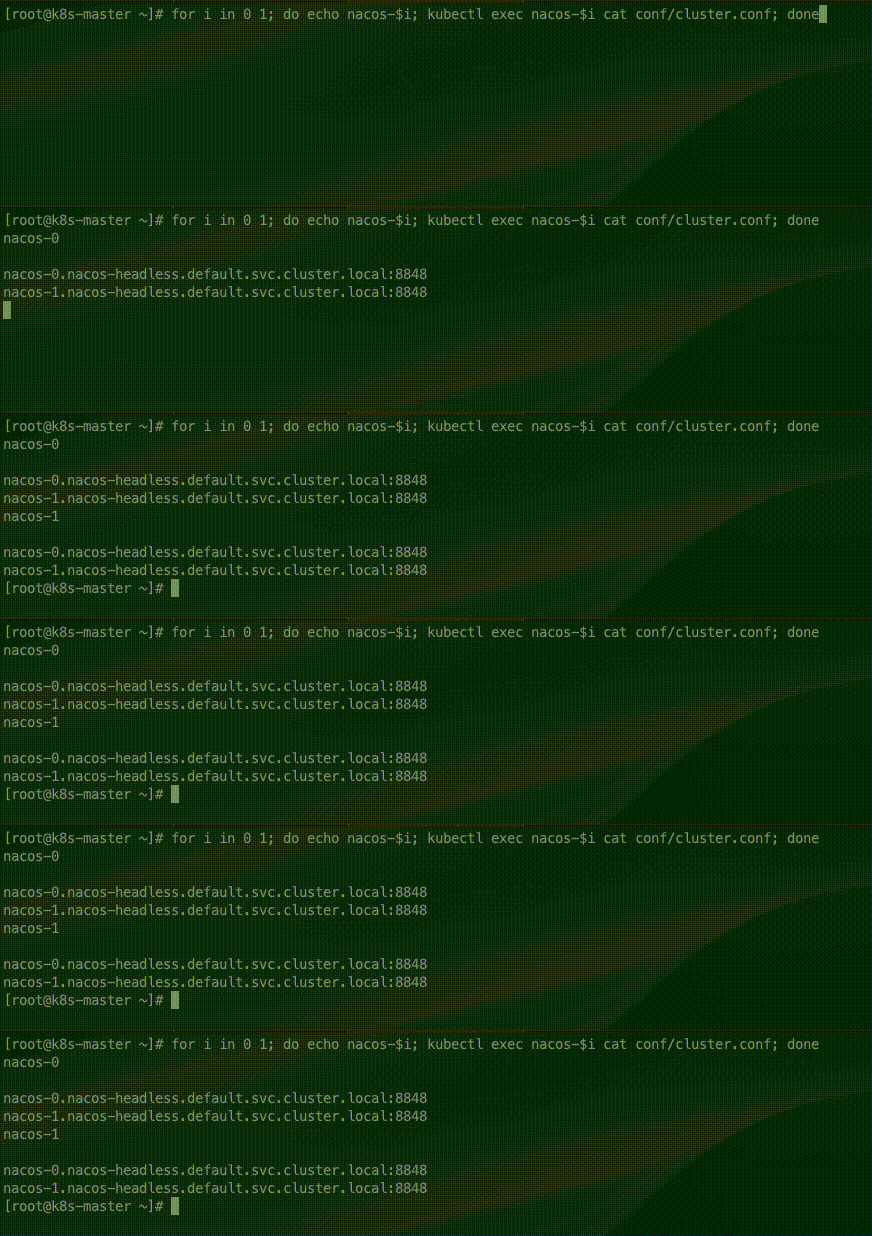
for i in 0 1; do echo nacos-$i; kubectl exec nacos-$i cat conf/cluster.conf; doneThe StatefulSet controller provides a unique hostname for each pod based on its ordinal index. The hostname format is <statefulset name>-<ordinal index>. Because the replicas field of the Nacos StatefulSet is set to 2, the current cluster file contains only two Nacos node addresses.
- Use
kubectl scaleto dynamically scale out Nacos.
kubectl scale sts nacos --replicas=3
- After scaling out, use
kubectl execto obtain the Nacos cluster configuration file information in the pods.
for i in 0 1 2; do echo nacos-$i; kubectl exec nacos-$i cat conf/cluster.conf; done
- Use
kubectl execto call the Nacos API on each node and check whether the current Leader is consistent.
for i in 0 1 2; do echo nacos-$i; kubectl exec nacos-$i curl -X GET "http://localhost:8848/nacos/v1/ns/raft/state"; doneAt this point, the new node has joined the Nacos cluster successfully.
3.6. Configuration Properties
nacos-pvc-nfs.yamlornacos-quick-start.yaml
| Name | Required | Description |
|---|---|---|
mysql.host | Y | Self-managed database address. Required when an external database is used. |
mysql.db.name | Y | Database name. |
mysql.port | N | Database port. |
mysql.user | Y | Database username. Do not include the , character. |
mysql.password | Y | Database password. Do not include the , character. |
SPRING_DATASOURCE_PLATFORM | Y | Database type. The default value is embedded, which means the embedded database. Only mysql and embedded are supported. |
NACOS_REPLICAS | N | Determines the number of Nacos startup nodes. If you do not use the dynamic scale-out plugin, configure this property. After the scale-out plugin is used, this property does not take effect. |
NACOS_SERVER_PORT | N | Nacos port provided to the peer_finder plugin. |
NACOS_APPLICATION_PORT | N | Nacos port. |
PREFER_HOST_MODE | Y | Starts the Nacos cluster with domain-name resolution. |
- nfs
deployment.yaml
| Name | Required | Description |
|---|---|---|
NFS_SERVER | Y | NFS server address. |
NFS_PATH | Y | NFS shared directory. |
server | Y | NFS server address. |
path | Y | NFS shared directory. |
- mysql
| Name | Required | Description |
|---|---|---|
MYSQL_ROOT_PASSWORD | N | Root password. |
MYSQL_DATABASE | Y | Database name. |
MYSQL_USER | Y | Database username. |
MYSQL_PASSWORD | Y | Database password. |
MYSQL_REPLICATION_USER | Y | Database replication user. |
MYSQL_REPLICATION_PASSWORD | Y | Database replication user password. |
Nfs:server | N | NFS server address. It is not required for local deployment. |
Nfs:path | N | NFS shared directory. It is not required for local deployment. |