
Nacos MCP Router User Guide
Overview
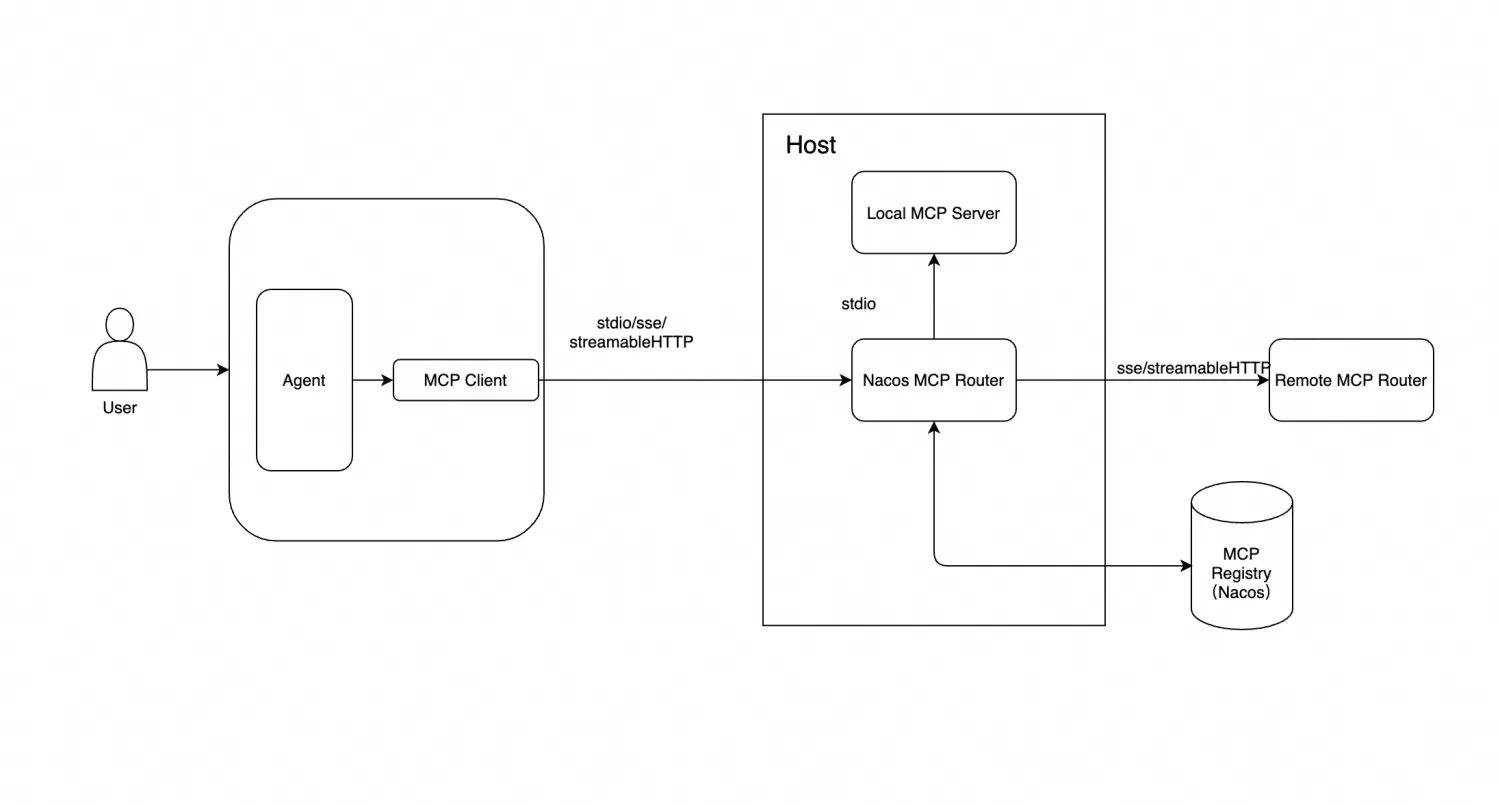
Nacos MCP Router is an MCP Server implemented based on the official MCP standard SDK. It provides tools for MCP Server recommendation, distribution, installation, and proxying other MCP Servers, helping users consume MCP Server services more conveniently. Its main architecture is as follows:
Features
Nacos MCP Router provides two working modes:
- Router mode: the default mode. It helps users consume MCP Server services more conveniently through MCP Server recommendation, installation, and proxying other MCP Servers.
- Proxy mode: enabled by setting the
MODE=proxyenvironment variable. With simple configuration, it converts MCP Servers that use the SSE or stdio protocol into MCP Servers that use the streamable HTTP protocol.
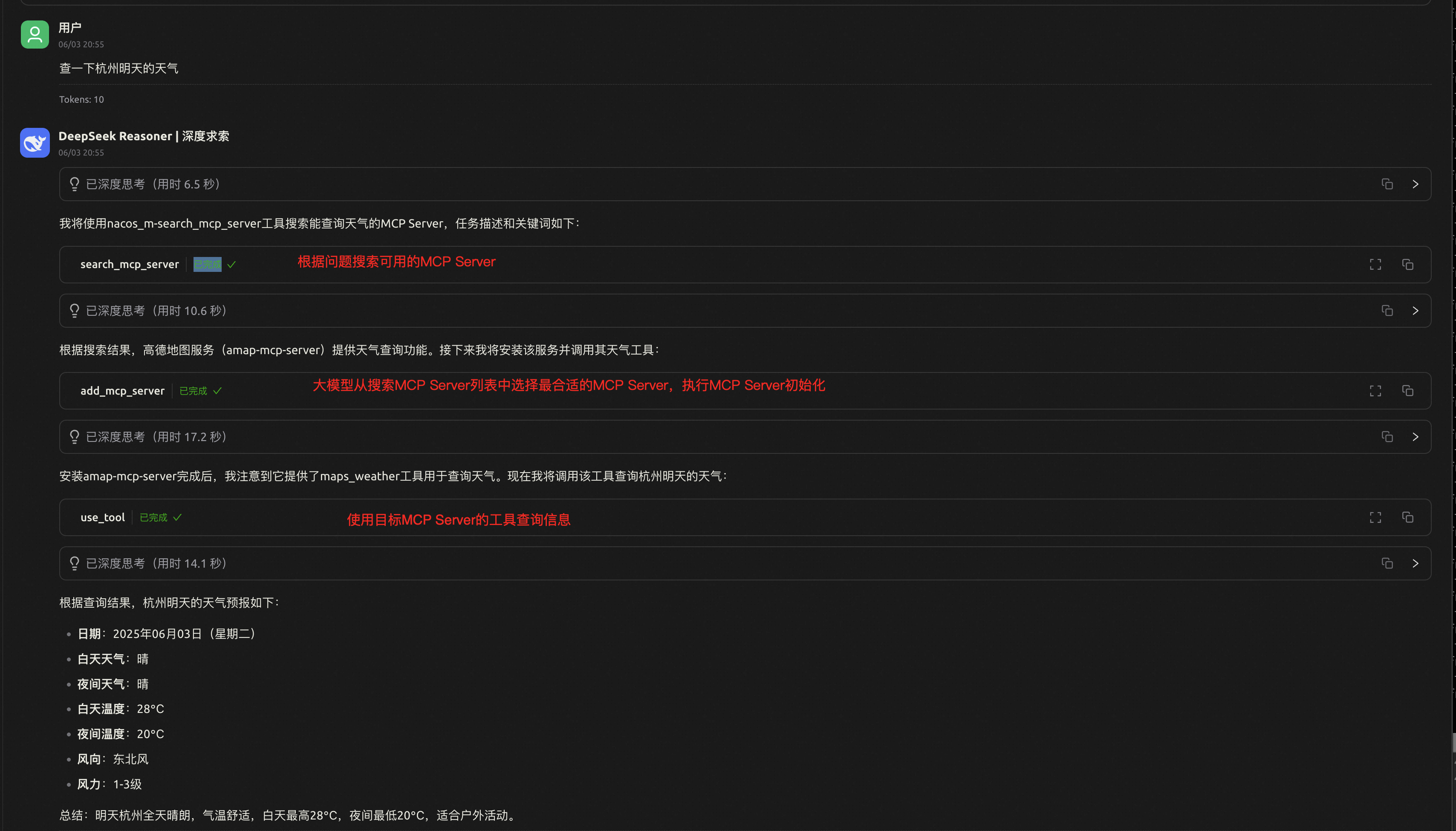
In router mode, Nacos MCP Router works as a standard MCP Server and provides MCP Server recommendation, distribution, installation, and proxy capabilities. The main tools are:
search_mcp_server- Searches the MCP registry (Nacos) for related MCP Servers based on a task description and keywords.
- Input:
task_description(string): task description. Example: “What is the weather in Hangzhou today?”key_words(string): task keywords. Example: “weather, Hangzhou”
- Output: list of MCP servers and instructions to complete the task.
add_mcp_server- Adds and initializes an MCP Server, establishes a connection to it based on the configuration in Nacos, and waits for calls.
- Input:
mcp_server_name(string): name of the MCP Server to add.
- Output: MCP Server tool list and usage instructions.
use_tool- Proxies tools from other MCP Servers.
- Input:
mcp_server_name(string): name of the target MCP Server to call.mcp_tool_name(string): name of the target MCP Server tool to call.params(map): parameters of the target MCP Server tool to call.
- Output: output from the target MCP Server tool.
In proxy mode, Nacos MCP Router only provides proxy capabilities and can convert stdio or SSE protocol MCP Servers to the streamable HTTP protocol without code changes.
Quick Start
Prerequisites
Nacos MCP Router uses Nacos as the MCP Registry. Make sure the Nacos service has been started in the background. For more information, see Nacos Quick Start.
Router Mode
-
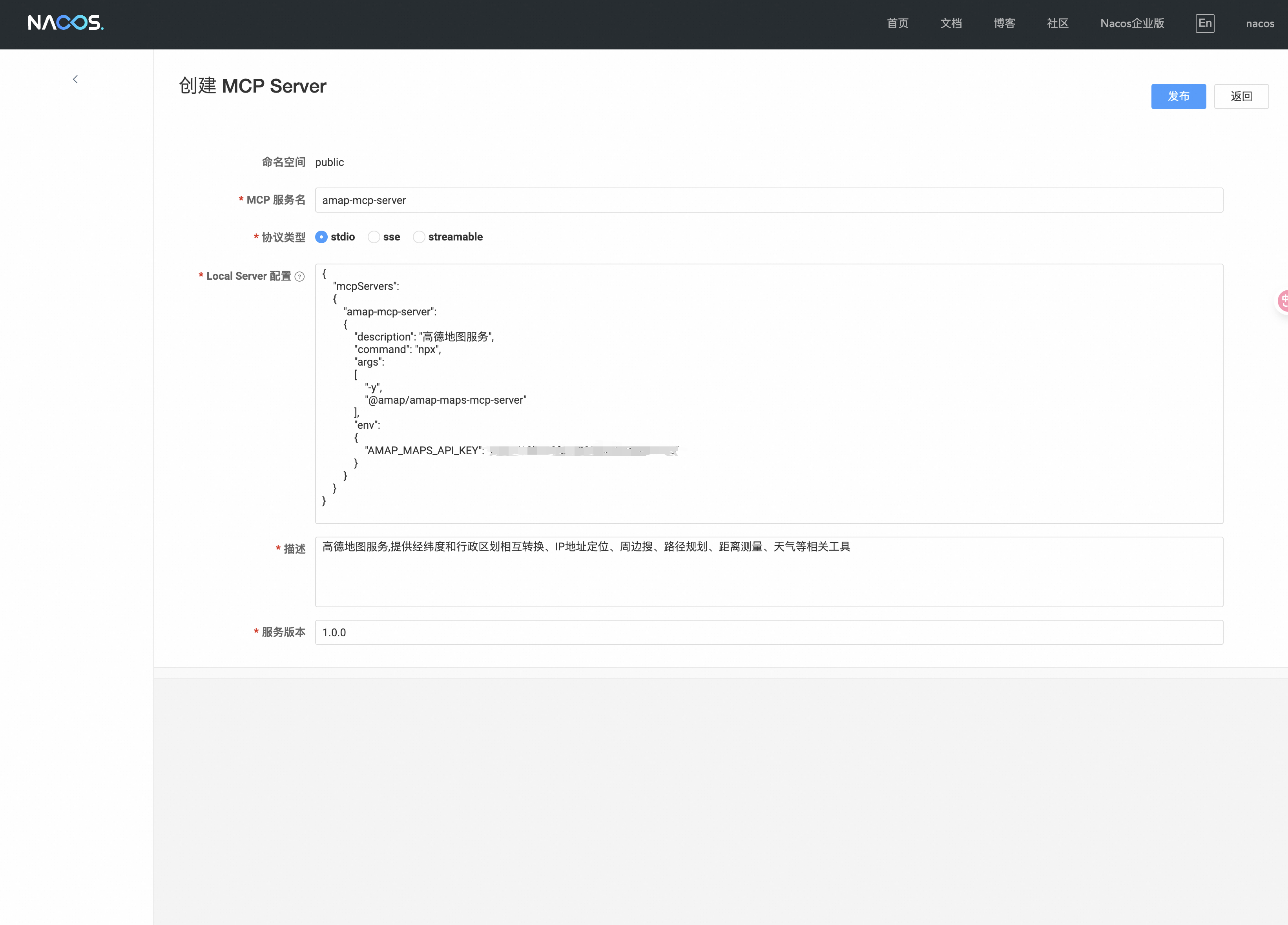
Register an MCP Server. Register the MCP Server that may be used in the Nacos console and configure the MCP Server. The following example uses AutoNavi Maps.
-
Start Nacos MCP Router.
-
Start in stdio mode. In stdio mode, configure Nacos MCP Router directly in Claude, Cline, or CherryStudio.
- Start with uvx.
{"mcpServers":{"nacos-mcp-router":{"command": "uvx","args":["nacos-mcp-router@latest"],"env":{"NACOS_ADDR": "<NACOS-ADDR>, optional, defaults to 127.0.0.1:8848","NACOS_USERNAME": "<NACOS-USERNAME>, optional, defaults to nacos","NACOS_PASSWORD": "<NACOS-PASSWORD>, required"}}}}- Start with Docker.
{"mcpServers": {"nacos-mcp-router": {"command": "docker","args": ["run", "-i", "--rm", "--network", "host", "-e", "NACOS_ADDR=<NACOS-ADDR>", "-e", "NACOS_USERNAME=<NACOS-USERNAME>", "-e", "NACOS_PASSWORD=<NACOS-PASSWORD>" ,"-e", "TRANSPORT_TYPE=stdio", "nacos-mcp-router:latest"]}}} -
Start in SSE mode.
- Start with uvx.
Terminal window export NACOS_ADDR=127.0.0.1:8848export NACOS_USERNAME=nacosexport NACOS_PASSWORD=$PASSWORDexport TRANSPORT_TYPE=sseuvx nacos-mcp-router@latest- Start with Docker.
Terminal window docker run -i --rm --network host -e NACOS_ADDR=$NACOS_ADDR -e NACOS_USERNAME=$NACOS_USERNAME -e NACOS_PASSWORD=$NACOS_PASSWORD -e TRANSPORT_TYPE=sse nacos-mcp-router:latest -
Start in streamable HTTP mode.
- Start with uvx.
Terminal window export NACOS_ADDR=127.0.0.1:8848export NACOS_USERNAME=nacosexport NACOS_PASSWORD=$PASSWORDexport TRANSPORT_TYPE=streamable_httpuvx nacos-mcp-router@latest- Start with Docker.
Terminal window docker run -i --rm --network host -e NACOS_ADDR=$NACOS_ADDR -e NACOS_USERNAME=$NACOS_USERNAME -e NACOS_PASSWORD=$NACOS_PASSWORD -e TRANSPORT_TYPE=streamable_http nacos-mcp-router:latest
-
-
Test with apps such as Claude, Cline, or CherryStudio. The following example uses CherryStudio.
- stdio mode configuration.
{"mcpServers": {"nacos-mcp-router": {"command": "docker","args": ["run", "-i", "--rm", "--network", "host", "-e", "NACOS_ADDR=<NACOS-ADDR>", "-e", "NACOS_USERNAME=<NACOS-USERNAME>", "-e", "NACOS_PASSWORD=<NACOS-PASSWORD>" ,"-e", "TRANSPORT_TYPE=stdio", "nacos-mcp-router:latest"]}}}- SSE mode configuration.
{"mcpServers": {"nacos-mcp-router": {"url": "http://127.0.0.1:8000/sse"}}}- streamable HTTP mode configuration.
{"mcpServers": {"nacos-mcp-router": {"url": "http://127.0.0.1:8000/mcp"}}} -
Try Nacos MCP Router.
Proxy Mode
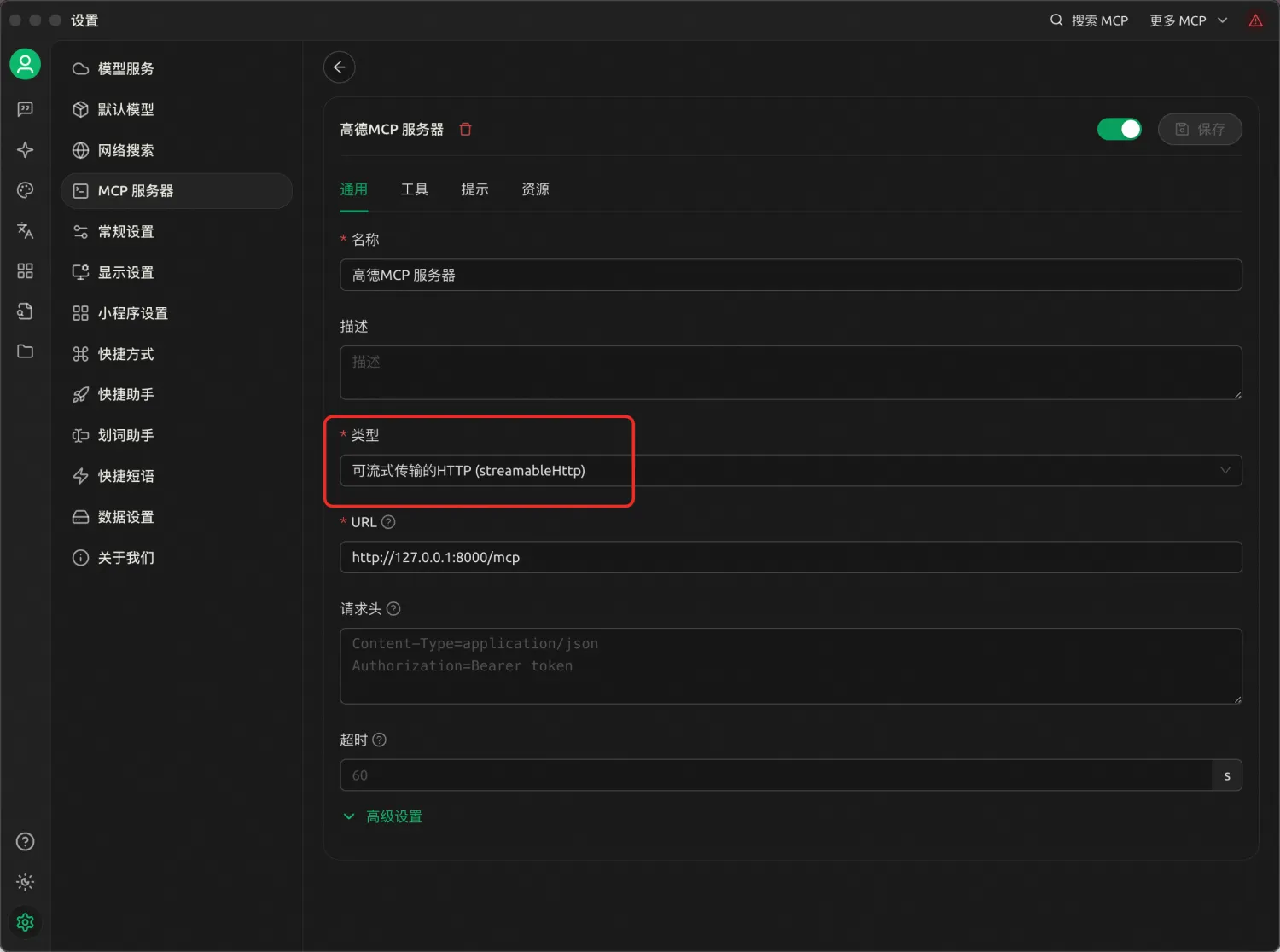
Proxy mode is designed to help existing MCP Servers that use stdio or SSE convert to the streamable HTTP protocol and benefit from streamable HTTP. In proxy mode, Nacos MCP Router only transparently forwards requests and exposes the tool list of the target MCP Server.
In proxy mode, set the MODE=proxy and PROXIED_MCP_NAME environment variables. Example:
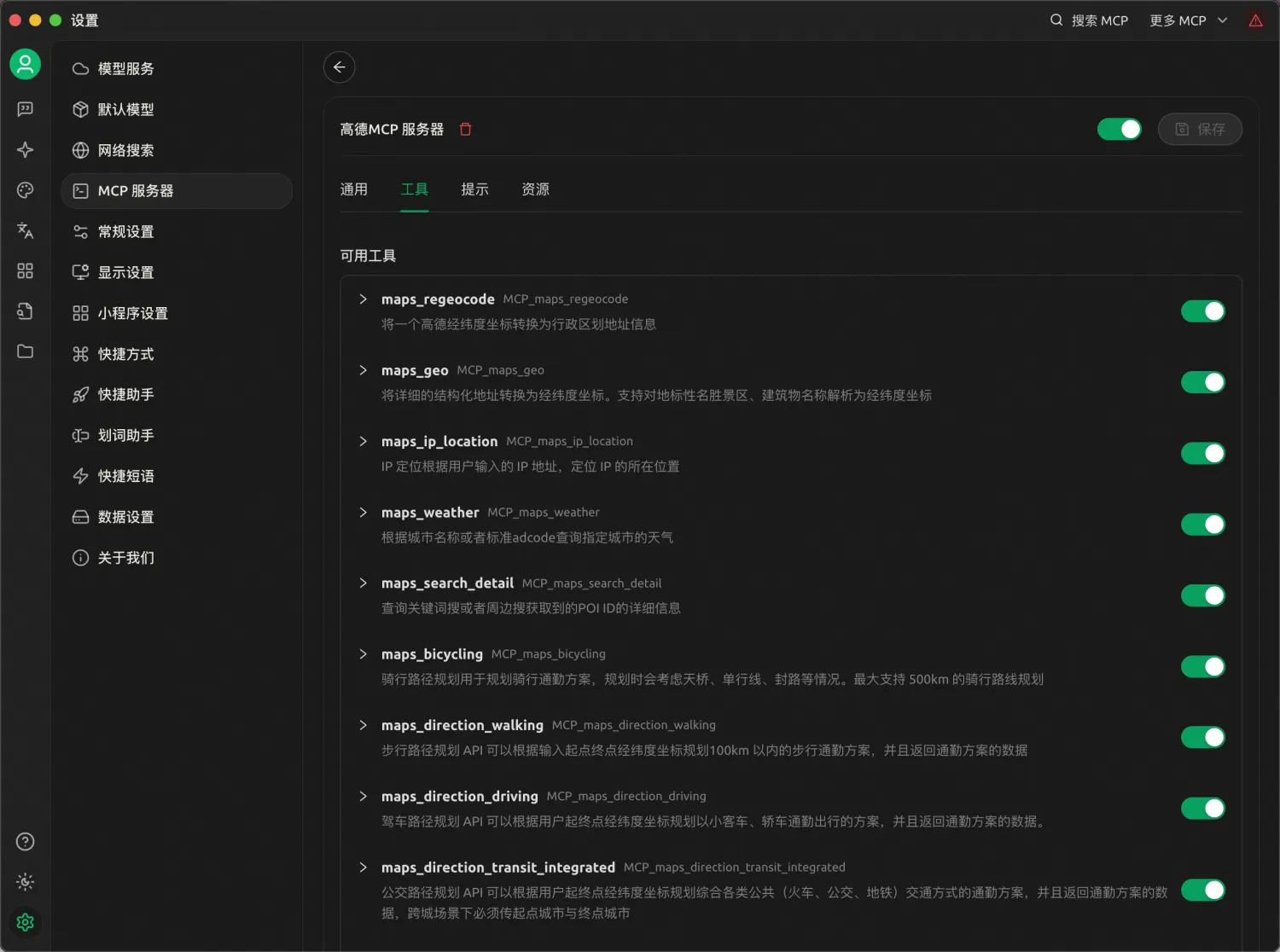
docker run -i --rm --network host -e NACOS_ADDR=$NACOS_ADDR -e NACOS_USERNAME=$NACOS_USERNAME -e NACOS_PASSWORD=$NACOS_PASSWORD -e TRANSPORT_TYPE=streamable_http -e MODE=proxy -e PROXIED_MCP_NAME=$PROXIED_MCP_NAME nacos-mcp-router:latestAfter startup succeeds, configure the CherryStudio MCP settings. You can then see the proxied MCP tool list.
Environment Variables
| Parameter | Description | Default value | Required | Remarks |
|---|---|---|---|---|
| NACOS_ADDR | Nacos server address | 127.0.0.1:8848 | No | Enter the Nacos server address, such as 192.168.1.1:8848. Include the port. |
| NACOS_USERNAME | Nacos username | nacos | No | Enter the Nacos username, such as nacos. |
| NACOS_PASSWORD | Nacos password | password | Yes | Enter the Nacos password, such as nacos. |
| NACOS_NAMESPACE | Nacos namespace | public | No | Nacos namespace, such as public. |
| TRANSPORT_TYPE | Transport protocol type | stdio | No | Optional values: stdio, sse, streamable_http. |
| PROXIED_MCP_NAME | Proxied MCP Server name | - | No | Name of the MCP Server to convert in proxy mode. The MCP Server must be registered in Nacos first. |
| MODE | Working mode | router | No | Optional values: router and proxy. |
| PORT | Service port | 8000 | No | Used when the protocol type is SSE or streamable HTTP. |