
Deployment Overview
Nacos Deployment Guide
Nacos is positioned as an internal IDC application component, not as a product for public network environments. Deploy it in an isolated internal network. Public network deployment is strongly discouraged.
Network-related concepts mentioned in this documentation, such as VIPs and network interface cards, refer to internal network environments.
1. Nacos Deployment Architecture
Since Nacos 3.0, Nacos has split and optimized the Nacos console and the Nacos server based on the 2.x architecture.
At the network layer, Nacos 3.0 adds a separate network access port for the Nacos console. The console is no longer coupled to the main Nacos port (server.port, default 8848), which improves Nacos security.
| Port | Offset from the main port | Description |
|---|---|---|
| 8848 | 0 | Nacos HTTP API port, used to access Nacos Admin APIs and HTTP Open APIs |
| 9848 | 1000 | Client gRPC port on the server, used by clients to connect to and request the server |
| 9849 | 1001 | Server gRPC port on the server, used for inter-server synchronization |
| 7848 | -1000 | JRaft port on the server, used to process Raft requests between servers |
| 8080 | Independently configured | Nacos console port, used to access the Nacos console and Nacos console APIs |
When using VIP or nginx requests, configure the Nacos gRPC port (default
9848) for TCP forwarding. Do not configure HTTP or HTTP/2 forwarding, otherwise nginx will disconnect the connection.When exposing ports externally, expose only the console port (default
8080) and the gRPC port (default9848). Expose the main port (default8848) only when needed. Other ports are used for inter-server communication. Do not expose them, and do not expose any port to the public network.
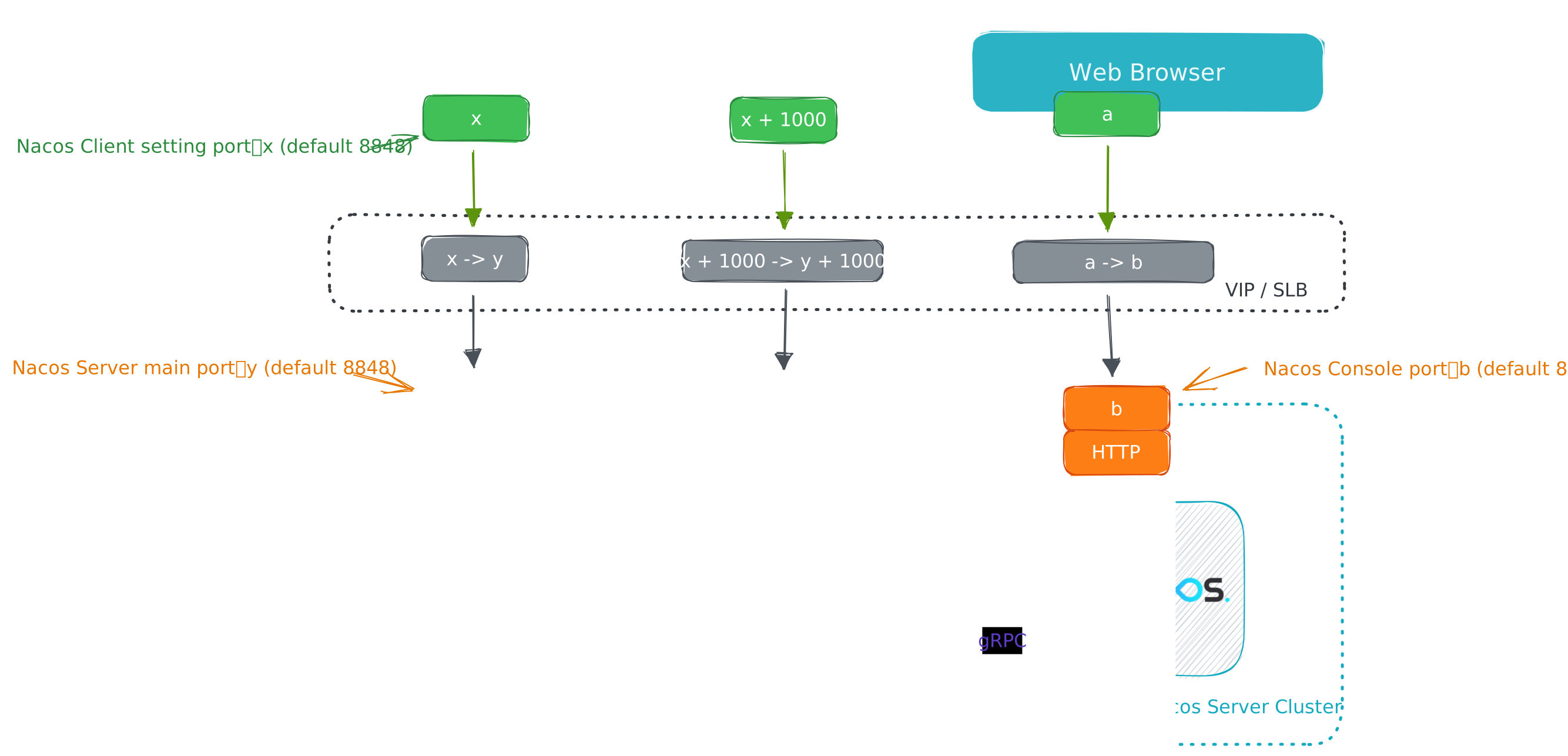
Most client requests are sent to the server through the gRPC port (default 9848), but some plugin requests, such as login requests from the Nacos authentication plugin, are sent through the Nacos main port (default 8848). To make upgrades easier and keep compatibility with existing usage habits, the Nacos 3.0 client keeps the same port calculation logic as the Nacos 2.x client: configure the main port (default 8848) and calculate the corresponding gRPC port (default 9848) by using the same offset.
Therefore, if port forwarding or a firewall exists between the client and server, adjust the port forwarding and firewall configurations accordingly.
2. Nacos Deployment Modes
Nacos supports three deployment modes:
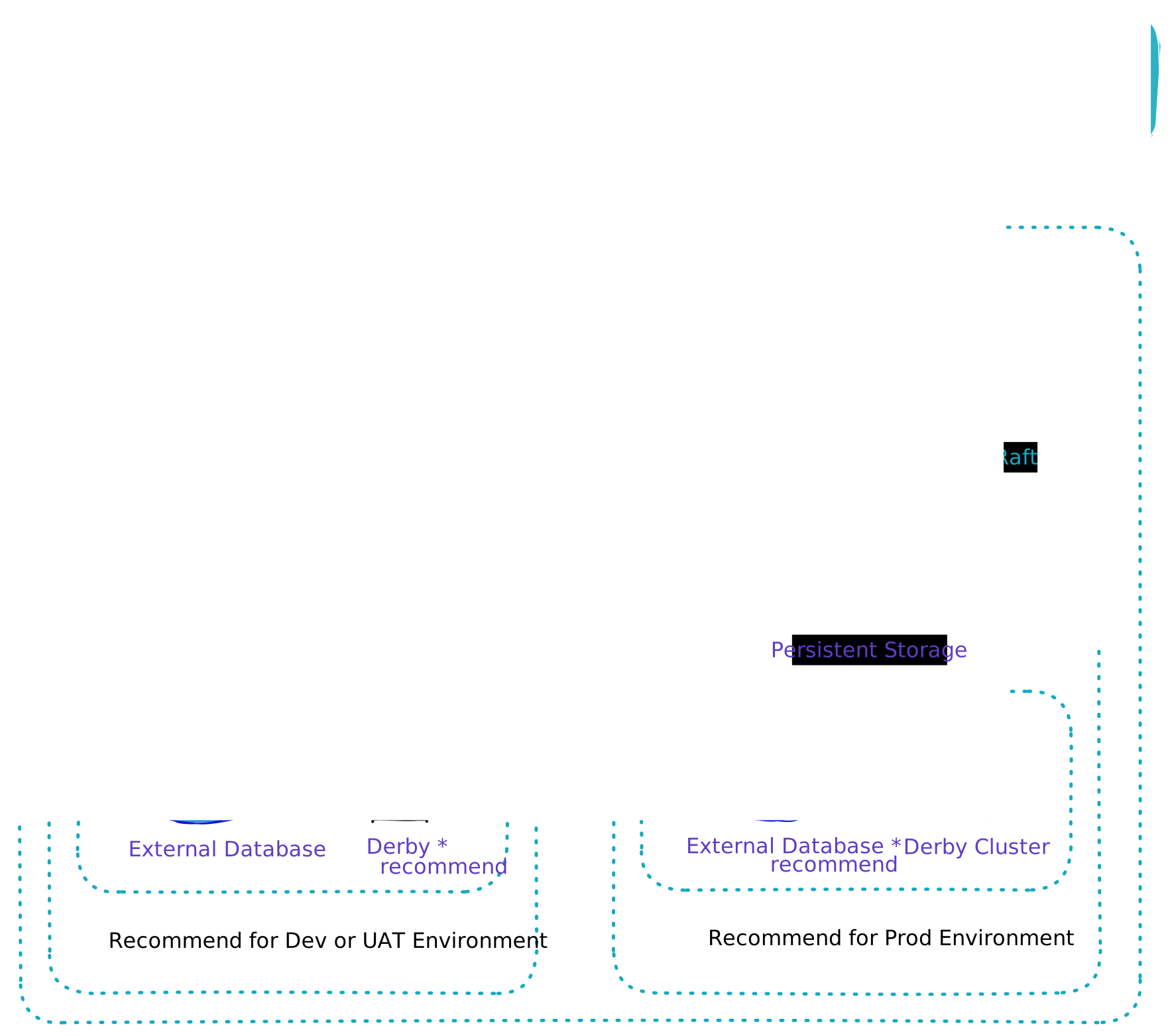
- Standalone mode, also called single-instance mode. It is mainly used for testing and single-machine trials.
- Cluster mode. It is mainly used in production environments to ensure high availability.
- Multi-cluster mode (TODO). It is used for multi-data-center scenarios.
2.1. Standalone Mode
Standalone mode, also called single-instance mode, provides all Nacos features and capabilities. It is easy to deploy and starts quickly. However, it cannot form a cluster with other nodes and cannot provide high availability during node or network failures. Standalone mode can use the built-in Derby database (default) or an external database for storage.
Standalone mode is mainly suitable for engineers who build a Nacos environment locally or in a test environment for development, debugging, and testing. It can also be used for some business scenarios with low stability and availability requirements.
For deployment details, see Standalone Deployment.
2.2. Cluster Mode
Cluster mode uses the self-developed Distro consistency protocol and the Raft protocol to build a highly available Nacos cluster from multiple Nacos nodes. Data is synchronized across nodes in the cluster to ensure consistency. Cluster mode provides high availability, scalability, and concurrency, and keeps services running when failures occur. Cluster mode uses an external database by default, but can also use the built-in database for storage.
This mode is mainly suitable for production environments and is the deployment mode most recommended by the community.
For deployment details, see Cluster Deployment.
2.3. Multi-Cluster Mode (TODO)
Nacos supports NameServer-based request routing. With this mode, you can design mapping rules to forward requests to the corresponding cluster, such as routing requests by namespace or tenant.
3. Select Modules by Function Mode
The deployment mode determines the Nacos node topology and high-availability model. The function mode determines which business modules a node loads at runtime. These two settings can be combined.
Starting with Nacos 3.2.2, use the microservice function mode when you need only configuration management and service discovery. This mode loads only the Config and Naming modules and does not load the AI module. As a result, AI Registry capabilities for resources such as MCP Servers, Skills, Prompts, Agents, and AgentSpecs, together with their console entries, are unavailable.
For standalone mode, run:
sh startup.sh -m standalone -f microserviceFor cluster mode, use the same function mode on every node:
sh startup.sh -f microserviceFor the complete function-mode and property reference, see System Parameters.
4. Independent Nacos Console Deployment
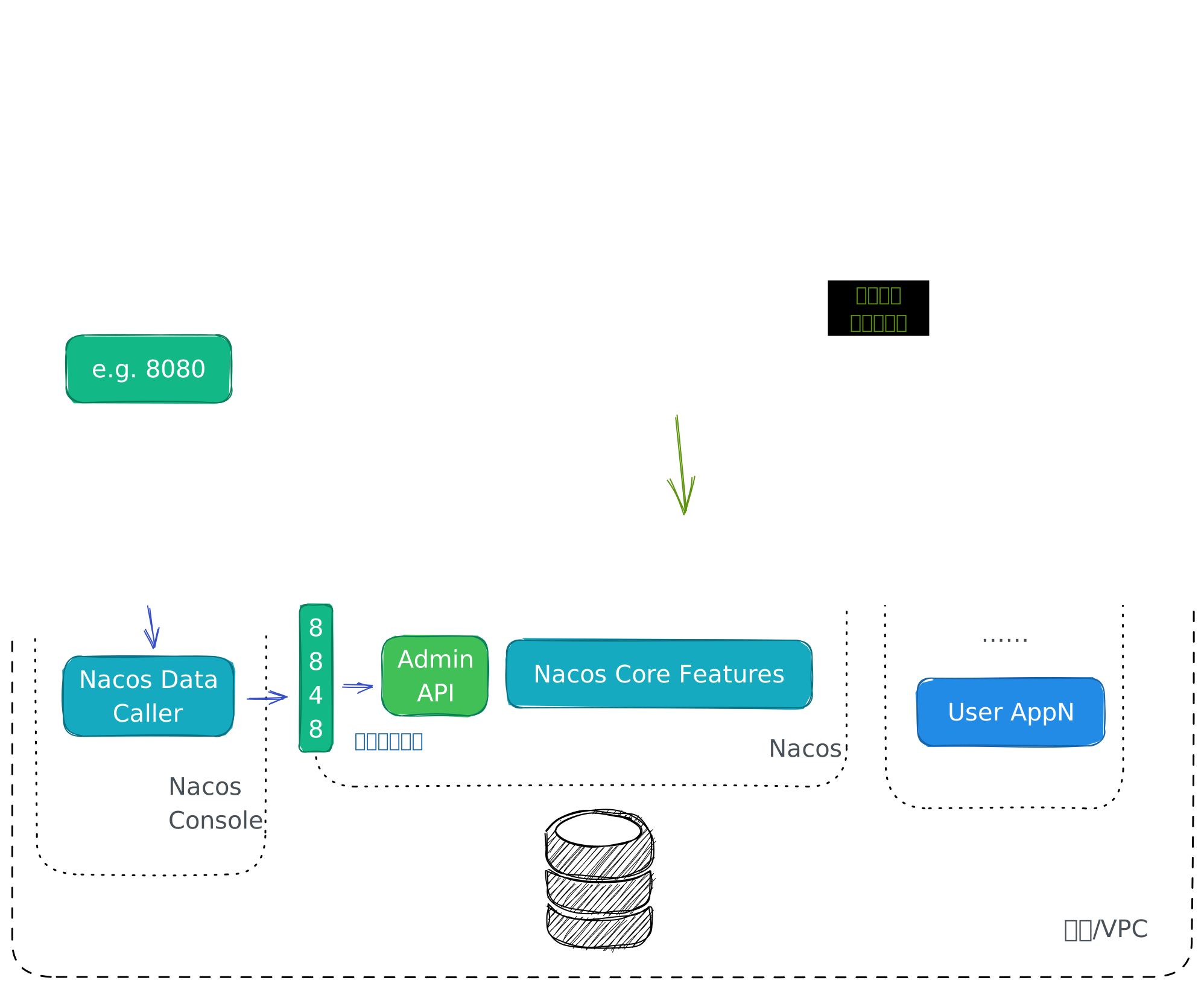
Starting from Nacos 3.0, Nacos supports independent console deployment. By further separating high-risk requests from resource-intensive requests, independent console deployment improves Nacos security and stability.
To deploy Nacos Server independently, add the -d server parameter to the startup command, for example: sh startup.sh -d server.
To deploy Nacos Console independently, add the -d console parameter to the startup command, for example: sh startup.sh -d console.
For independent console deployment details, see Independent Console Deployment.
Before going to production, continue with Deployment Best Practices to check internal network boundaries, independent console deployment, external database storage, authentication, visibility, traffic control, configuration encryption, and rollback plans.
5. Multi-NIC IP Selection
When the local environment is complex, Nacos needs to select the IP address or network interface card to use at startup. Nacos obtains IP addresses from multiple NICs by referring to the Spring Cloud design. You can use nacos.inetutils parameters to specify the NIC and IP address used by Nacos. The following configuration parameters are supported:
ip-addressdirectly sets the Nacos IP address.
nacos.inetutils.ip-address=10.11.105.155use-only-site-local-interfacesallows Nacos to use a LAN IP address. This is useful when the machine that deploys Nacos has multiple NICs and you want Nacos to select a LAN NIC.
nacos.inetutils.use-only-site-local-interfaces=trueignored-interfacessupports a NIC array and allows Nacos to ignore multiple NICs.
nacos.inetutils.ignored-interfaces[0]=eth0nacos.inetutils.ignored-interfaces[1]=eth1preferred-networksallows Nacos to prefer matching IP addresses. Regular expression matching and prefix matching are supported.
nacos.inetutils.preferred-networks[0]=30.5.124.nacos.inetutils.preferred-networks[0]=30.5.124.(25[0-5]|2[0-4]\\d|((1d{2})|([1-9]?\\d))),30.5.124.(25[0-5]|2[0-4]\\d|((1d{2})|([1-9]?\\d)))