
Nacos Client Addressing
When using Nacos, the Nacos client must configure the Nacos Server address so that the client can connect to Nacos Server and implement features such as service discovery and registration.
This document describes the addressing logic of Nacos clients and the priority of different addressing methods. For clients in some programming languages that support extended addressing, this document also describes how to implement custom addressing logic.
1. Basic Client Addressing Logic
When Nacos clients locate Nacos Server, the specific implementation may vary, but the basic logic is as follows:
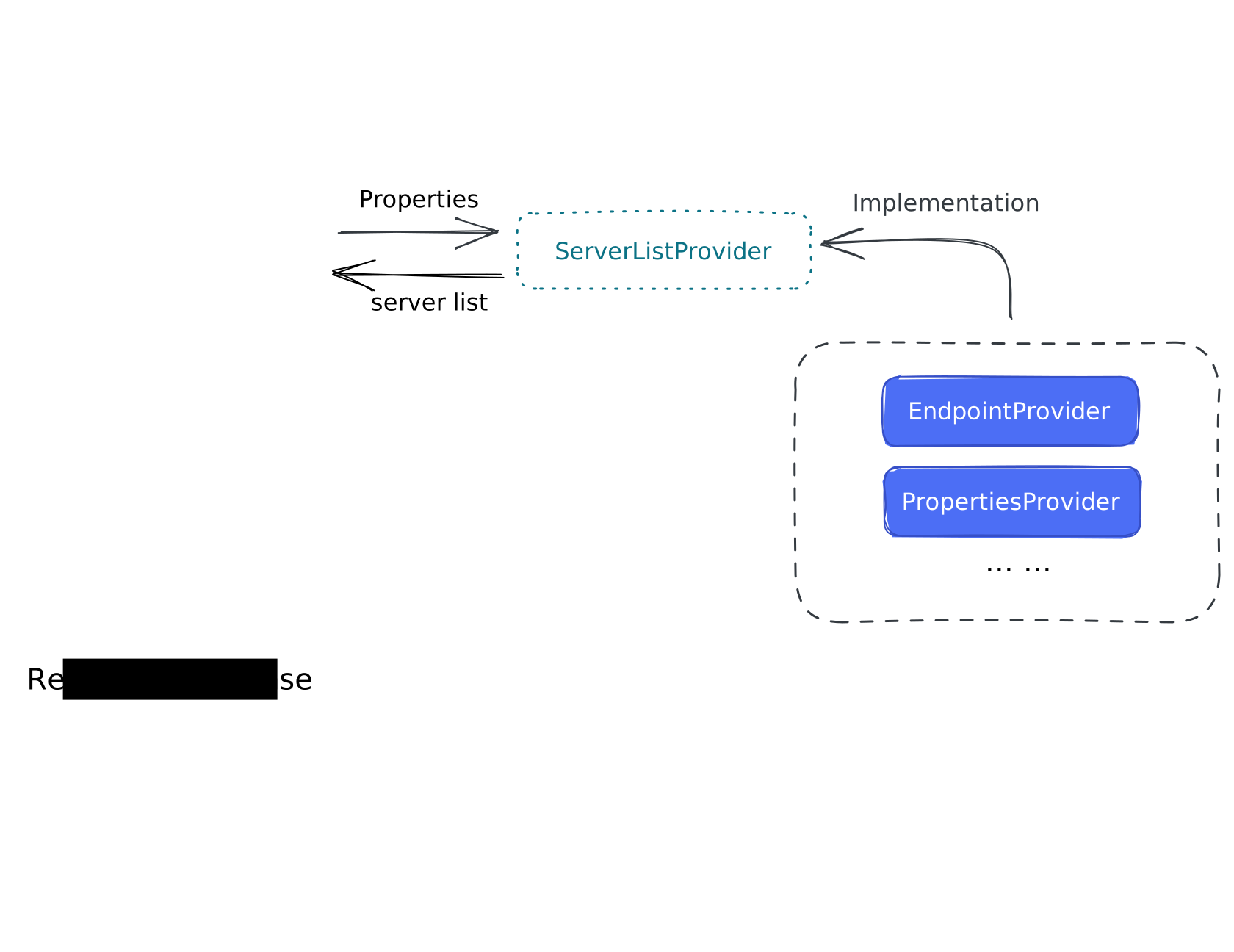
- First, the Nacos client receives configuration from the application during initialization, such as
Properties. - During Nacos client initialization, a
ServerListManageris created to manage the server address list. - Based on the passed
Propertiesconfiguration,ServerListManagerselects the correspondingServerListProviderto actually obtain the server address list. By default, the Nacos client providesPropertiesServerListProviderbased onserver-addrconfiguration andEndpointServerListProviderbased on an endpoint address server. - After
ServerListManagerselects and initializes theServerListProviderand obtains the server address list from it, the Nacos client creates theGrpcClientused for communication, uses the server address list managed byServerListManagerto create connections, and sends requests to the corresponding Nacos Server.
Different ServerListProvider implementations lead to different client behavior when finding the server address list. The following sections describe the usage conditions, behavior, results, priorities, and other characteristics of different ServerListProvider implementations.
1.1. Configuration-based Addressing Logic
The Nacos client provides a configuration-based ServerListProvider by default: PropertiesServerListProvider. This ServerListProvider obtains the server address list from configuration based on the server-addr setting. If multiple server addresses exist in the configuration, the Nacos client splits them by , and ;, and finally randomly selects one as the server address.
If the currently selected server address is unavailable, the Nacos client tries other server addresses one by one in round-robin mode. After trying all addresses, it returns to the first server address and continues polling until an available server address is found or the client stops.
The biggest advantage of this addressing method is its simple Nacos client configuration. You only need to configure server-addr; no additional server address list configuration or extra component deployment is required. However, this addressing method is less flexible because the server address list cannot be dynamically modified. To change it, you must create a new Nacos client.
Example:
Note: Configuration methods may differ across programming languages. Adjust them according to your actual situation.
try {// Initialize the configuration service, and the console automatically obtains the following parameters through the sample code.    String serverAddr = "{serverAddr}";    Properties properties = new Properties();    properties.put("serverAddr", serverAddr);
    ConfigService configService = NacosFactory.createConfigService(properties);    NamingService configService = NacosFactory.createNamingService(properties);} catch (NacosException e) {    // TODO Auto-generated catch block    e.printStackTrace();}
sc := []constant.ServerConfig{ { IpAddr: `{serverAddr1}`, Port: 8848, }, { IpAddr: "{serverAddr2}", Port: 8848, }}
//create ClientConfigcc := *constant.NewClientConfig()
// create clientnamingClient, err := clients.NewNamingClient( vo.NacosClientParam{ ClientConfig: &cc, ServerConfigs: sc, },)
configClient, err := clients.NewConfigClient( vo.NacosClientParam{ ClientConfig: &cc, ServerConfigs: sc, },)To be added.
1.2. Endpoint Address Server-based Addressing Logic
The Nacos client also provides an address server-based addressing method: EndpointServerListProvider. This ServerListProvider obtains the server address list from the address server pointed to by the endpoint configuration.
The address server can be any server that provides the corresponding HTTP interface, such as nginx, a Tomcat server, or the Nacos address module. The corresponding interface must return the Nacos Server address list in the required format, with one address per line, for example:
127.0.0.1:88481.1.1.1If a returned address does not contain a port, the default port is 8848.
Similarly, the Nacos client randomly selects one address from the list as the server address and uses it to access Nacos Server. If the address is unavailable, the Nacos client tries other server addresses one by one in round-robin mode. After trying all addresses, it returns to the first server address and continues polling until an available server address is found or the client stops.
The biggest advantage of this addressing method is that the server address list connected by the client can be dynamically updated without restarting the client. However, this method requires deploying an additional address server to provide interfaces for updating and obtaining the address list, and it may require more configuration. It is suitable for scenarios where the Nacos deployment is large.
Example:
Note: Configuration methods may differ across programming languages. Adjust them according to your actual situation.
For more address server-related configuration, see Java SDK Properties - Common Parameters.
try {    // Initialize the configuration service, and the console automatically obtains the following parameters through the sample code.    String endpoint = "{endpoint}";    Properties properties = new Properties();    properties.put("endpoint", endpoint);
    ConfigService configService = NacosFactory.createConfigService(properties);    NamingService configService = NacosFactory.createNamingService(properties);} catch (NacosException e) {    // TODO Auto-generated catch block    e.printStackTrace();}
cc := constant.ClientConfig{ Endpoint: "{endpoint}:8080",}
// a more graceful way to create config clientclient, err := clients.NewConfigClient( vo.NacosClientParam{ ClientConfig: &cc, },)To be added.
1.3. Trigger Priority of Different Addressing Logic
When the Nacos client starts and multiple addressing methods are configured at the same time, the Nacos client obtains server addresses in the following priority order:
EndpointServerListProvideris used first. The client attempts to readendpoint-related configuration. If it exists,EndpointServerListProvideris used to obtain the server address list. By default,endpoint-related configuration follows this priority:- 1.1. The environment variable
ALIBABA_ALIWARE_ENDPOINT_URLhas the highest priority. If it exists,ALIBABA_ALIWARE_ENDPOINT_URLis used as the address server address. - 1.2. Next, the
endpointconfiguration in thePropertiespassed during initialization takes priority. If it exists, the address configured byendpointis used as the address server address. - 1.3. Then, the
endpointconfiguration in JVM parameters takes priority. If it exists, the address configured byendpointin the JVM is used as the address server address. - 1.4. Finally, the
endpointin environment variables is used if it exists.
- 1.1. The environment variable
- If none of the preceding
EndpointServerListProviderconfigurations exist,PropertiesServerListProvideris used:- 2.1. The
serverAddrconfiguration in thePropertiespassed during initialization is used first. If it exists, the address configured byserverAddris used as the Nacos Server address list. - 2.2. Next, the
serverAddrconfiguration in JVM parameters is used if it exists. - 2.3. Finally, the
serverAddrin environment variables is used if it exists.
- 2.1. The
The preceding priority order is the default priority order. Clients in different programming languages may have different priority orders. Adjust them according to your actual situation. In addition, if the Java SDK configuration lookup priority is set, all configuration items except
ALIBABA_ALIWARE_ENDPOINT_URLare read according to the configured priority order.
2. Custom Addressing Method
Currently, only the Java SDK supports custom addressing methods. SDKs in other languages do not support this yet.
The Nacos Java SDK can customize ServerListProvider through SPI to implement custom addressing methods.
2.1. Add Dependencies
<!-- nacos-client versions later than 2.5.0 support custom ServerListProvider. --><dependency> <groupId>com.alibaba.nacos</groupId> <artifactId>nacos-client</artifactId> <version>2.5.0</version></dependency>2.2. Implement a Custom ServerListProvider
Implement the com.alibaba.nacos.client.address.ServerListProvider interface.
The corresponding ServerListProvider interfaces are as follows:
| Method | Input | Return | Description |
|---|---|---|---|
| init | NacosClientProperties, NacosRestTemplate | void | Called during initialization to inject Nacos configuration, the HTTP client, and other objects, so that you can read parameters passed during initialization and obtain other information through HTTP APIs. |
| getServerList | None | List<String> | Called by ServerListManager to obtain the server address list. |
| getServerName | None | String | Gets the server name corresponding to this ServerListProvider, used to mark the server name corresponding to the address list. |
| getNamespace | None | String | Gets the namespace to which this ServerListProvider belongs, namely the namespace to which this Nacos client belongs. |
| getContextPath | None | String | Gets the server context path corresponding to this ServerListProvider. When Nacos Server is configured with a context path, this context path is required so the Nacos client can access the server. |
| getOrder | None | int | Gets the priority of ServerListProvider. A larger number indicates a higher priority. The priority of EndpointServerListProvider is 500, and the priority of PropertiesServerListProvider is 499. |
| match | NacosClientProperties | boolean | Determines whether the current ServerListProvider matches the current Nacos client configuration. If it matches, the Nacos client calls init to initialize this ServerListProvider. |
| isFixed | None | boolean | Determines whether the address list provided by the current ServerListProvider is fixed. For example, EndpointServerListProvider is variable, while PropertiesServerListProvider is fixed. |
| getAddressSource | None | String | Gets the source address of the address list for this ServerListProvider. For example, EndpointServerListProvider returns the Endpoint address, and PropertiesServerListProvider returns “ (empty string). |
| shutdown | None | void | Shuts down the ServerListProvider. This interface is called during shutdown so that you can close related resources, such as the HTTP client. |
2.3. Use a Custom ServerListProvider
Add the corresponding SPI configuration file META-INF/services/com.alibaba.nacos.client.address.ServerListProvider to your resources directory.
Example content:
org.example.MyServerListProviderThen, in the Properties passed during initialization, configure the corresponding parameters that allow the custom ServerListProvider to match. For example:
public class MyServerListProvider implements ServerListProvider {
    public int getOrder() {        return Integet.MAX_VALUE;    }
    public boolean match(NacosClientProperties nacosClientProperties) {        return Boolean.parseBoolean(nacosClientProperties.getProperty("example.server.list.provider"));    }}
The configuration should be:
example.server.list.provider=true