
Independent Console
Independent Console Deployment
Nacos is positioned as an internal IDC application component, not as a product for public network environments. Deploy it in an isolated internal network. Public network deployment is strongly discouraged.
Network-related concepts mentioned in this documentation, such as VIPs and network interface cards, refer to internal network environments.
1. Independent Nacos Console Deployment Overview
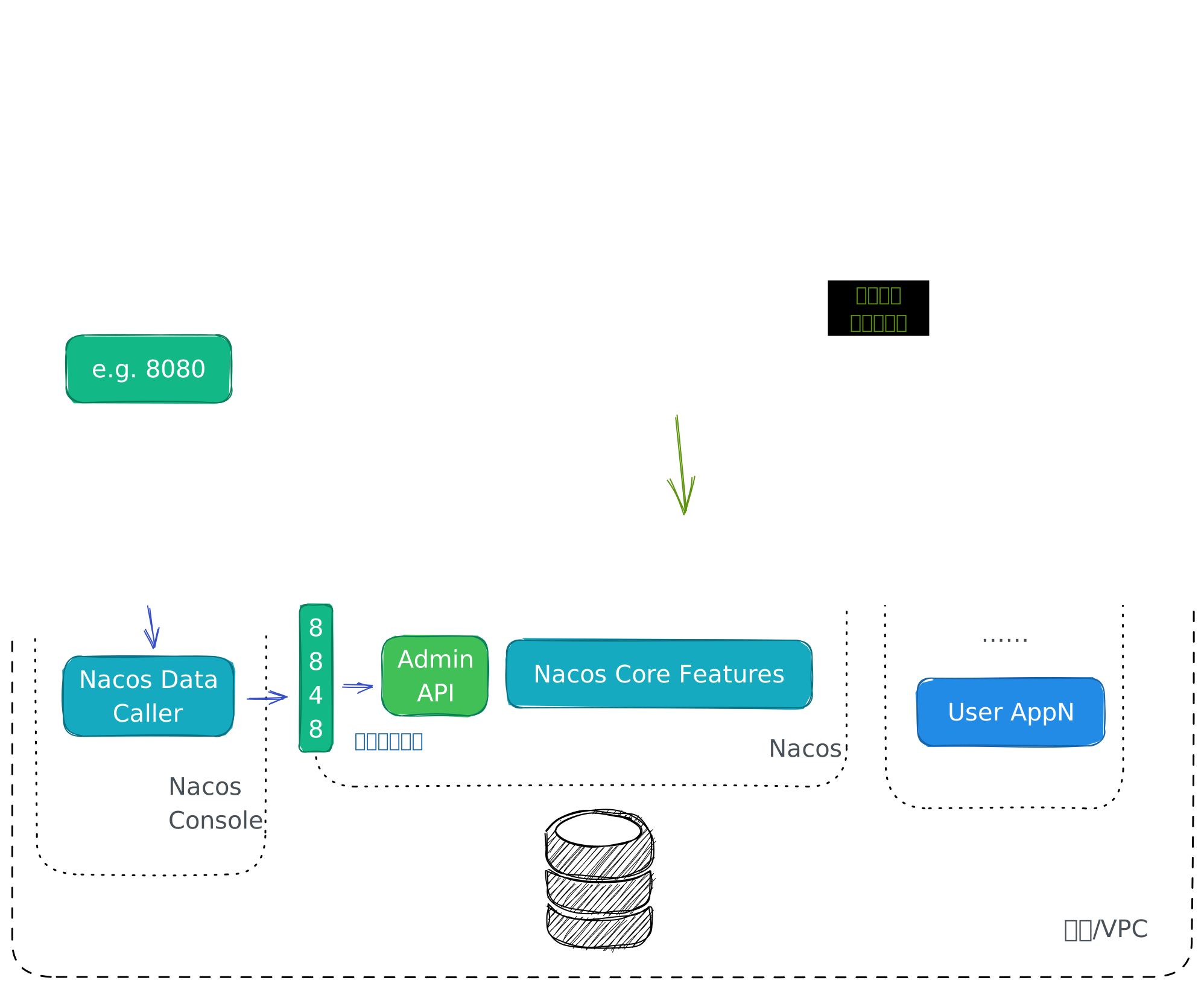
Starting from Nacos 3.0, Nacos supports independent console deployment. By further separating high-risk requests from resource-intensive requests, independent console deployment improves Nacos security and stability.
To deploy the Nacos console independently, first deploy a Nacos cluster service without console or a Nacos standalone service without console, then start Nacos Console separately and make sure some configurations are consistent between the two.
2. Deploy Nacos Service Without Console
First, refer to Nacos Cluster Deployment or Nacos Standalone Deployment. In the Start Nacos Service step, replace sh startup.sh or sh startup.sh -m standalone with sh startup.sh -d server or sh startup.sh -m standalone -d server.
After the Nacos service starts successfully, copy the conf/cluster.conf file or record the ip:port of the Nacos service for later use.
3. Deploy Nacos Console
3.1. Environment Preparation
Nacos Console depends on Java to run. Make sure the following environment is available:
- 64-bit OS, including Linux, Unix, macOS, or Windows. Linux, Unix, or macOS is recommended.
- 64-bit JDK 17 or later. Download and configure it.
3.2. Decompress the Nacos Console Release Package
The release package for the independent Nacos console is the same as the Nacos service release package. Copy the release package from the previous Deploy Nacos Service Without Console step to the console deployment environment, and then run the following commands to decompress it:
unzip nacos-server-$version.zip # or tar -xvf nacos-server-$version.tar.gz cd nacos/bin3.3. Configure the Nacos Service Address File
Because the independent Nacos console does not store data, it must access the actual Nacos service to obtain data. Therefore, configure the Nacos service address in the corresponding configuration file.
In the conf directory under the Nacos decompression directory nacos/, configure the cluster.conf file with one ip:port entry per line. Its content should be the conf/cluster.conf file or the recorded Nacos service ip:port from Deploy Nacos Service Without Console. Example:
# ip:port200.8.9.16:8848200.8.9.17:8848200.8.9.18:88483.4. Modify Configuration Files (Optional)
Modify application.properties in the conf directory under the Nacos decompression directory. Find the configuration items that start with nacos.console and modify them as needed. Example:
### Nacos Console Main portnacos.console.port=8080### Nacos Console context path:nacos.console.contextPath=### Nacos Server context path, which link to nacos server `nacos.server.contextPath`, works when deployment type is `console`nacos.console.remote.server.context-path=/nacosYou must also configure authentication-related settings to avoid startup failures or access failures to the Nacos service. Example:
nacos.core.auth.server.identity.key=${your_custom_server_identity_key}nacos.core.auth.server.identity.value=${your_custom_server_identity_value}nacos.core.auth.plugin.nacos.token.secret.key=${your_custom_token_secret_key}3.5. Start Nacos Console
Run the following commands to start Nacos Console:
# Linux/Unix/Macsh startup.sh -d console
# Ubuntu
bash startup.sh -d console
# Windowsstartup.cmd -d console
The startup program then prompts you to enter the following 3 authentication-related configurations:
`nacos.core.auth.plugin.nacos.token.secret.key` is missing, please set: ${your_input_token_secret_key}nacos.core.auth.plugin.nacos.token.secret.key` Updated:----------------------------------`nacos.core.auth.server.identity.key` is missing, please set: ${your_input_server_identity_key}`nacos.core.auth.server.identity.key` Updated:----------------------------------`nacos.core.auth.server.identity.value` is missing, please set: ${your_input_server_identity_key}`nacos.core.auth.server.identity.value` Updated:----------------------------------3.6. Access Nacos Console
After startup is complete, access http://{ip}:{port} in your browser. {ip} is the IP address of Nacos Console, and {port} is the Nacos Console port, which defaults to 8080.
For Nacos console usage, see Console Guide.